
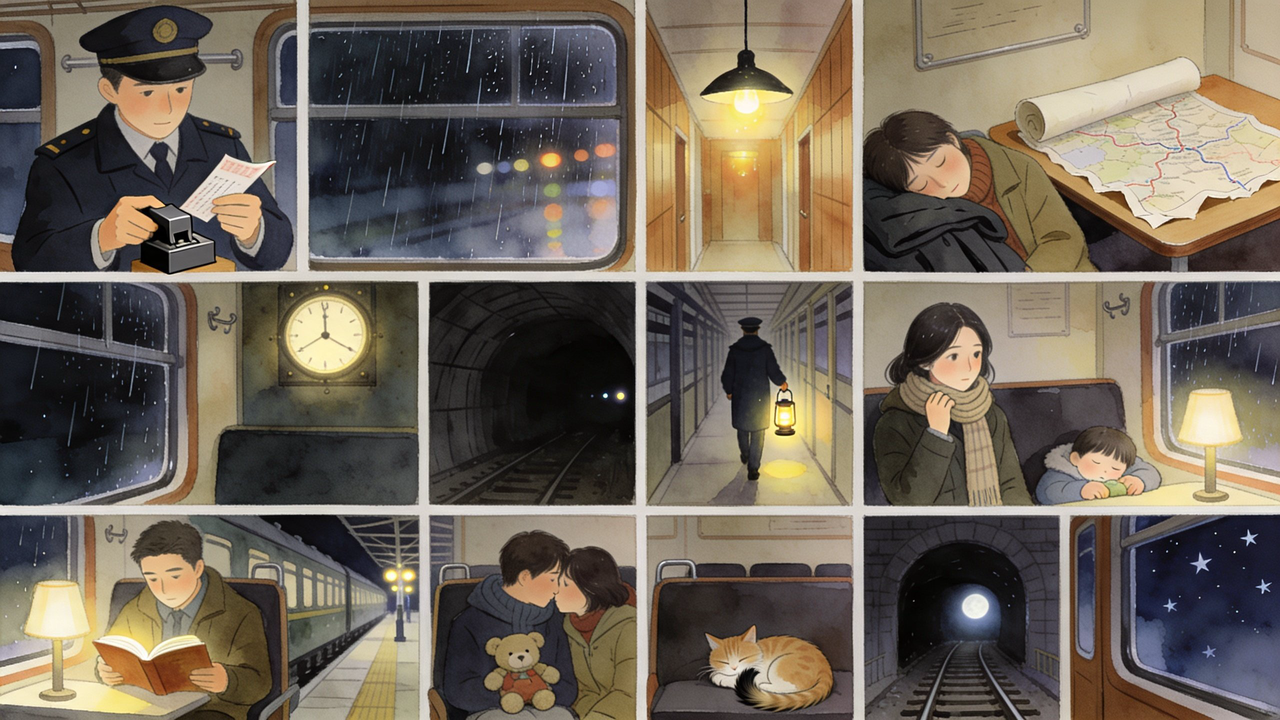
A storyboard helps you see a film before it exists. It shows scenes, moods, and camera choices in a compact visual plan. Making one by hand takes time, especially when you want many frames.
Dreamina’s latest and most advanced image generation model, Seedream 5.5, can generate grid storyboards with many panels in a single image, and it handles complex layouts and consistent style.
This guide explains how to plan 16-grid and 25-grid storyboards, how to describe each frame, and how to keep the whole sheet coherent.
Why grid storyboards are useful
A grid shows many ideas at once. You can compare angles, moods, and pacing across a whole sequence without flipping through separate images.
For directors, designers, and writers, that overview is valuable. It reveals whether the story has variety and rhythm. Dreamina with Seedream 5.5 lets you generate a full sheet quickly, then refine the frames that need work.
Meet Seedream 5.5, Dreamina’s most advanced image generation model
Seedream 5.5 powers Dreamina’s newest image tools and supports complex multi-panel layouts. Its main highlights include:
-
RGBA transparent layered generation for reusable assets
-
Precise editing of specified areas
-
Complex information design with accurate text and sensible structure
-
Improved portrait realism
-
Intelligent lighting with movie-style presets
For storyboards, layout control, style consistency, and lighting are the key strengths.
Create a storyboard in 3 fun steps with Dreamina
Step 1: Open Dreamina and write detailed text prompts
Open Dreamina, click “AI Image”, and describe the image you want to produce.
Example prompt: Generate a 25-grid single-shot storyboard in a handmade paper-cut animation style of a fishing harbor at dusk, with no characters or animals. Each grid is an independent film screenshot observing the same world from different camera positions, scenes, and compositions. Widescreen frame, deep slate blue, bone white, charcoal, and a touch of warm sand, with a quiet, textured, storybook mood.
Step 2: Choose a model, settings, and generate
Choose “Image 5.5 by Seedream 5.5” and adjust the image settings to match your needs, such as aspect ratio, resolution, and number of outputs. Once done, click “Generate” to build the storyboard.
Step 3: Refine and export
Fine-tune your specific areas by adjusting colors, shapes, text, or other visual details through follow-up edits. Once the storyboard looks right, check the final layout and text for accuracy, then click “Download” to save the generated storyboard image.
Describe the grid first
The prompt guide behind Seedream 5.5 gives a specific tip for film and television: report the grid layout and storyline first. Say how many panels the sheet has and what kind of frames they are.
Starting with the structure, such as 16 or 25 panels, tells the model how to divide the canvas. Then you can describe the world, the style, and the individual frames with fewer misunderstandings.
Two different kinds of storyboard
The manual shows two styles. The 16-grid example presents different scenes from a single story, such as a mountain camp where a radio malfunctions, someone studies a map, and a letter is tucked into a pocket.
The 25-grid example is a single-shot storyboard. Each cell is an independent screenshot of the same world from different camera positions, scenes, and compositions, not a continuous change of one lens. Know which type you want before you write the prompt.
Write frame-by-frame descriptions
For a story grid, list each frame as a short action. Keep every description visible and concrete, such as steam rising from a pot or footprints in mud.
The manual’s 16-grid example reads like a list of small moments. Short, specific lines are easier for the model to place in order. Avoid long sentences, and avoid abstract words like “tension” without a visible cue.
Control style and color
A storyboard feels unified when every frame shares a look. The manual’s 25-grid example specifies a 3D animated film style, a widescreen frame, and a color palette of dawn gold, light blue, copper green, ivory white, and a little warm orange.
Name your style, frame ratio, and palette. A delicate, clean texture and a clear mood, such as retro mechanical fantasy, give the sheet a consistent personality.
Vary camera positions
Variety keeps a storyboard interesting. Ask for wide shots, close-ups, high angles, and low angles in the same sheet.
The single-shot example emphasizes observing one world from different camera positions and compositions. Mention a few camera types in your prompt. This gives you a useful menu of options when you plan the real shoot or animation.
Use scene settings for world building
A single scene design can anchor a story. The manual’s crime drama example describes an underground video hall in an old air-raid shelter, with damp concrete walls, faded movie posters, plastic door curtains, wooden chairs, and a CRT TV.
Rich, visible details create atmosphere. List the materials, objects, and lighting. A detailed scene setting can also guide later frames in your storyboard.
Keep the sheet coherent
Check that props, colors, and settings remain consistent from frame to frame. A sheet that changes style halfway through feels messy.
If a frame breaks the pattern, fix it with a targeted follow-up edit that names its position in the grid. Short corrections keep the good frames untouched.
Review before you share
Before you download, scan the sheet like a director. A quick checklist helps:
-
The grid has the right number of frames
-
Each frame is distinct but belongs to the same world
-
Colors and style are consistent
-
Any text is spelled correctly
Final thoughts
Storyboards turn ideas into something you can discuss. With Dreamina’s Seedream 5.5, you can generate 16-grid and 25-grid sheets, control layout, style, and camera variety, and refine individual frames.
Describe the grid first, keep each frame concrete, set a shared palette, and review the whole sheet, and you’ll have a clear visual plan for your next film or story.